
⚡ Stop repeating the same answers. Automate your business conversations.Replying to the same questions again and again?
Feeling tired answering delivery, price, and availability questions? No worries. Shopi Flow Builder handles it automatically.
🚀 What is Shopi Flow Builder?
Shopi Flow Builder is a built-in chatbot automation system that allows you to:- Automatically reply to customer messages 💬
- Reduce manual workload
- Improve response time ⚡
- Provide consistent and accurate answers
💡 Best part: You don’t need any external tools — everything is built inside your Shopi dashboard.
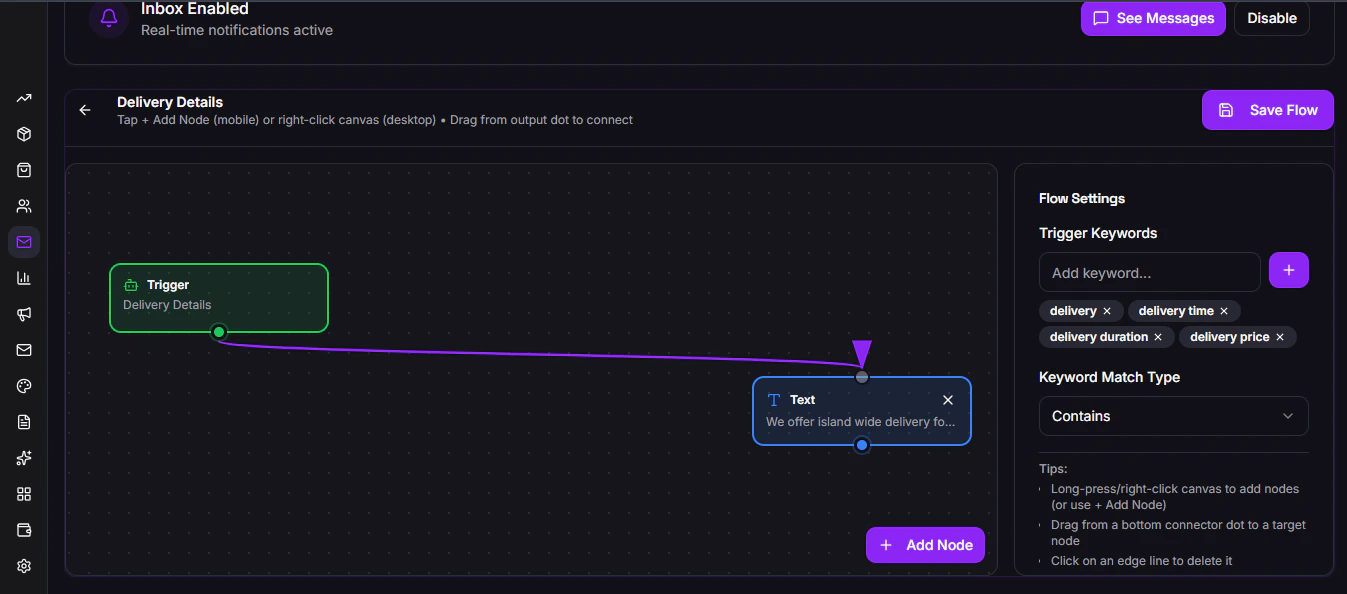
🧠 How It Works
Shopi uses a trigger → response system:- Customer sends a message
- Shopi detects keywords (trigger)
- Automatically sends a response\
You don’t need to spend extra money on Ai Api Keys. Ai is used to completely automize the live chats and chat flow is used to answer FAQ. Shopi offers it for FREE. Enjoy!
⚙️ Create Your First Auto Reply Flow
Follow these steps:1. Go to Auto Reply Flows
Navigate inside your Shopi dashboard:
Inbox → Auto Reply Flows
2. Create a New Flow
Click “Add Flow” and configure:- Trigger Keywords
- Response Type
3. Set Trigger Keywords
You can add keywords like:- delivery
- delivery price
- delivery time
- delivery duration
- free delivery
4. Add Response
You can respond with:- Text ✍️
- Images 🖼️
- Links 🔗