> ## Documentation Index
> Fetch the complete documentation index at: https://docs.shopi.lk/llms.txt
> Use this file to discover all available pages before exploring further.
# Store Customization Guide
> Learn how to customize your Shopi storefront using themes, click-to-edit editing, and advanced design controls. Shopi provides a safe, simple, and powerful theme editor designed for both beginners and advanced sellers.
Shopi lets sellers customize storefront design **without coding** while keeping performance high and layouts stable.
All customization happens through the **Theme System** and the **Theme Editor** inside the Seller Dashboard.
***
## 🧭 How Store Customization Works
When you create a new shop:
* A **Starter Theme** is applied by default
* You can switch themes anytime
* You can edit content and styles safely without breaking the layout
***
## 🏪 Accessing the Theme Editor
To customize your storefront:
1. Open your **Seller Dashboard**
2. Go to **Themes**
3. Click **Edit Storefront**
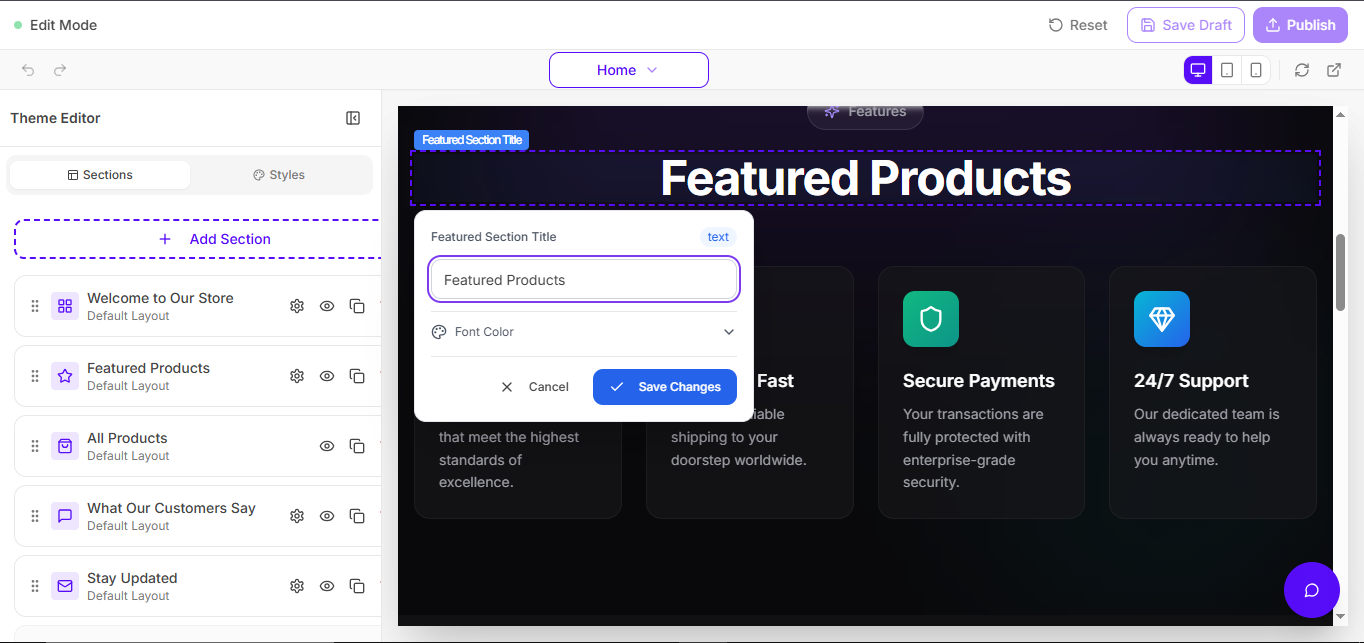 > **Tip:** If you don’t see editing tools, confirm you’re logged into the Seller Dashboard.
***
# ✨ Step 1 — Select or Change Theme
Shopi provides professionally designed templates optimized for:
* ✅ Mobile responsiveness
* ✅ Conversion-friendly layouts
* ✅ Fast loading performance
* ✅ Modern UI consistency
### ✅ Default Theme
All new shops start with:
> **Starter Theme**
You can change themes anytime. Your storefront remains structured and stable.
***
# ✏️ Step 2 — Edit Store Content (Click-to-Edit)
Shopi editing is intentionally simple:
> **Click what you want to edit. Change it. Save. Publish.**\
> No drag & drop. No complex builders.
You can edit:
* Text content
* Images
* Buttons and links
* Product sections
* Marketing sections
***
## 🚀 Why Shopi Avoids Drag & Drop Builders
Drag-and-drop builders often cause:
* Broken layouts
* Slow storefront performance
* Confusing editing experience
* Inconsistent design
Shopi focuses on:
✔ Stability\
✔ Speed\
✔ Simplicity\
✔ Design consistency
***
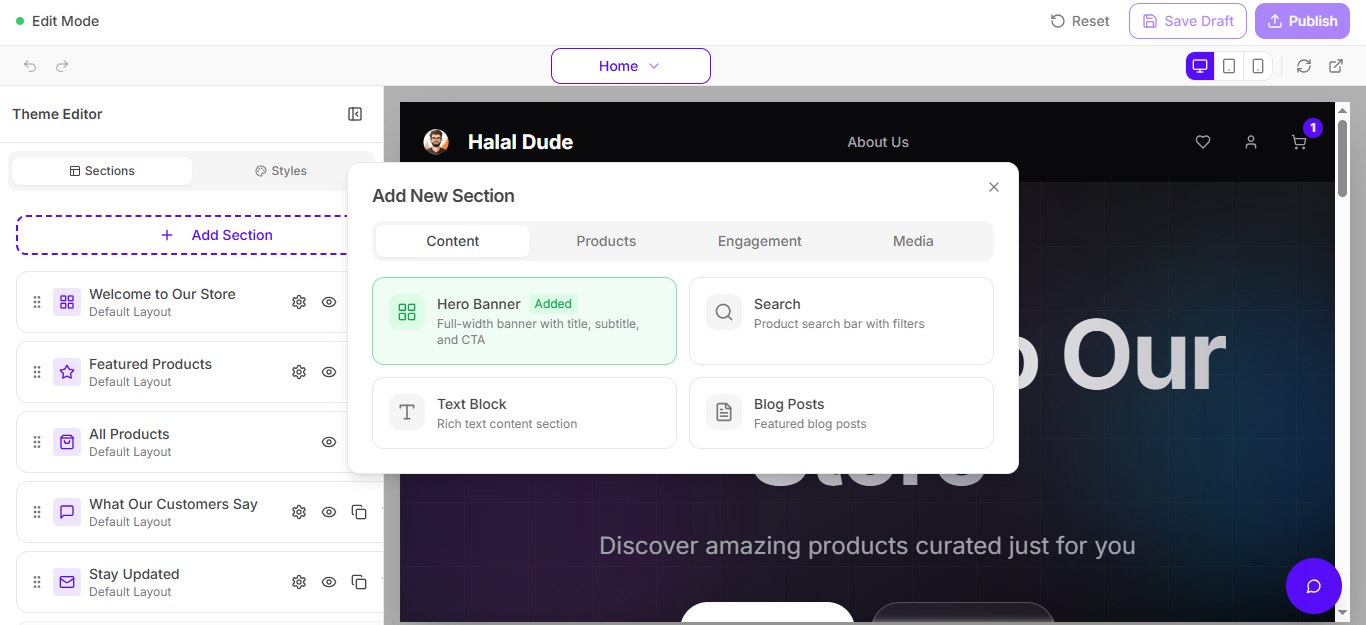
# 🧱 Step 3 — Add New Sections (+ Add Section)
Shopi storefronts are modular. You can expand your layout using pre-built sections.
## ➕ Add Section Feature
Click:
> **+ Add Section**
Then choose a category such as:
* **Content**
* **Products**
* **Engagement**
* **Media**
You can insert sections like:
* Hero banners
* Product showcases
* Search blocks
* Blog posts
* Testimonials
* Custom content blocks
> **Tip:** If you don’t see editing tools, confirm you’re logged into the Seller Dashboard.
***
# ✨ Step 1 — Select or Change Theme
Shopi provides professionally designed templates optimized for:
* ✅ Mobile responsiveness
* ✅ Conversion-friendly layouts
* ✅ Fast loading performance
* ✅ Modern UI consistency
### ✅ Default Theme
All new shops start with:
> **Starter Theme**
You can change themes anytime. Your storefront remains structured and stable.
***
# ✏️ Step 2 — Edit Store Content (Click-to-Edit)
Shopi editing is intentionally simple:
> **Click what you want to edit. Change it. Save. Publish.**\
> No drag & drop. No complex builders.
You can edit:
* Text content
* Images
* Buttons and links
* Product sections
* Marketing sections
***
## 🚀 Why Shopi Avoids Drag & Drop Builders
Drag-and-drop builders often cause:
* Broken layouts
* Slow storefront performance
* Confusing editing experience
* Inconsistent design
Shopi focuses on:
✔ Stability\
✔ Speed\
✔ Simplicity\
✔ Design consistency
***
# 🧱 Step 3 — Add New Sections (+ Add Section)
Shopi storefronts are modular. You can expand your layout using pre-built sections.
## ➕ Add Section Feature
Click:
> **+ Add Section**
Then choose a category such as:
* **Content**
* **Products**
* **Engagement**
* **Media**
You can insert sections like:
* Hero banners
* Product showcases
* Search blocks
* Blog posts
* Testimonials
* Custom content blocks
 > If you want a cleaner docs look later: upload a separate screenshot focused only on the “Add New Section” popup.
***
# 🎨 Step 4 — Advanced Customization (Styles)
Shopi includes advanced styling controls for brand customization.
You can customize:
* Fonts (family/size/weight)
* Font colors and brand palette
* Spacing (padding/margins)
* Page style (layout and appearance)
* Section styling and UI feel
***
# 🔐 Security: Protected Theme Editing
Shopi protects storefront editing using multiple security layers.
## 🛡️ Signed & Secure Edit Access
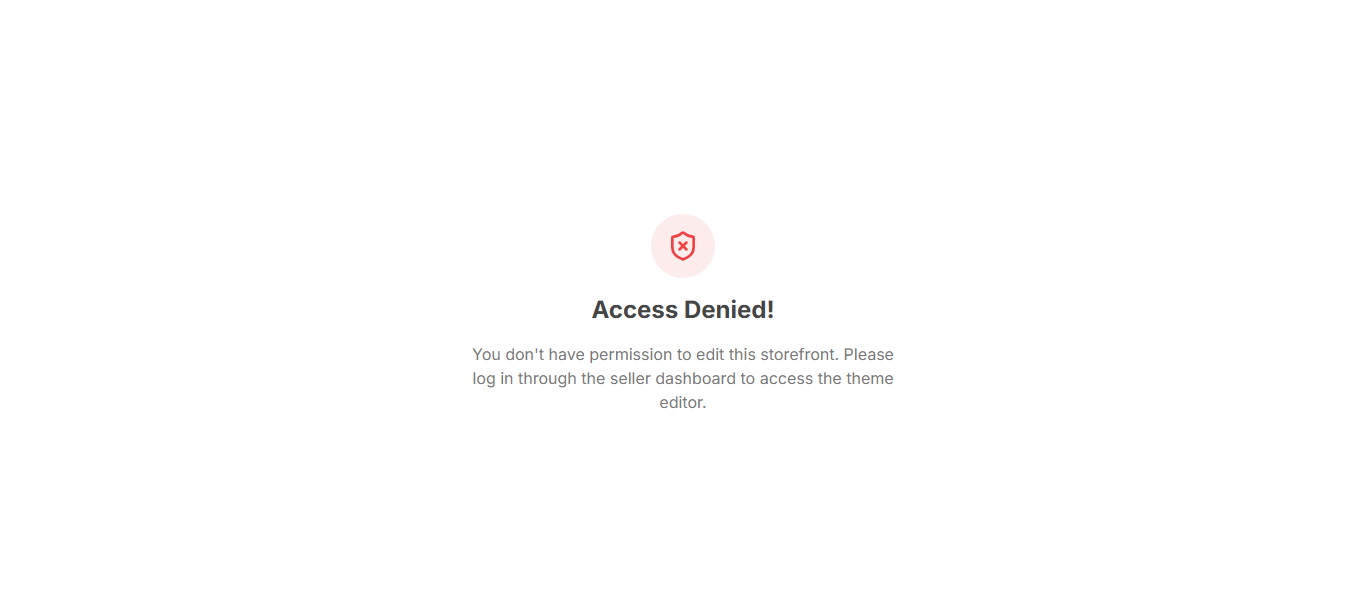
Even if someone gets the edit URL (unlikely), they still **cannot edit** without valid dashboard access.
* Edit URLs are **signed**
* Access requires **authentication**
* Unauthorized users are blocked
## 🚫 What Unauthorized Users See
> If you want a cleaner docs look later: upload a separate screenshot focused only on the “Add New Section” popup.
***
# 🎨 Step 4 — Advanced Customization (Styles)
Shopi includes advanced styling controls for brand customization.
You can customize:
* Fonts (family/size/weight)
* Font colors and brand palette
* Spacing (padding/margins)
* Page style (layout and appearance)
* Section styling and UI feel
***
# 🔐 Security: Protected Theme Editing
Shopi protects storefront editing using multiple security layers.
## 🛡️ Signed & Secure Edit Access
Even if someone gets the edit URL (unlikely), they still **cannot edit** without valid dashboard access.
* Edit URLs are **signed**
* Access requires **authentication**
* Unauthorized users are blocked
## 🚫 What Unauthorized Users See
 ***
## 🔑 The Only Way Someone Can Edit Your Store
They must:
* Log into your Seller Dashboard
* Have valid permissions
> The only realistic way someone edits your store is if **you share your password**. Don’t.
***
## 🔒 Password Security (Hashing + Salt)
Shopi protects seller accounts using secure password storage:
* Password hashing
* Salt encryption
* Session authentication tokens
* Secure access controls
Learn how Shopi protects seller accounts, storefronts, and business data using secure infrastructure.
***
# 🤖 AI + SEO Friendly Storefront Architecture
Shopi themes follow a structured storefront architecture designed to improve:
* Faster storefront loading
* Better search engine indexing
* Better AI understanding of your content
* Higher SEO ranking potential
***
# ✅ Best Practices for Store Customization
To improve conversions and performance:
* Use consistent brand colors
* Upload high-quality images
* Keep the homepage simple and focused
* Highlight best-selling products/services
* Avoid adding too many sections (clutter reduces sales)
***
# ❓ Troubleshooting
If you cannot edit your storefront:
* Confirm you are logged into the Seller Dashboard
* Refresh and try again
* Check whether your session expired
* Confirm you are editing the correct store
***
## 🔑 The Only Way Someone Can Edit Your Store
They must:
* Log into your Seller Dashboard
* Have valid permissions
> The only realistic way someone edits your store is if **you share your password**. Don’t.
***
## 🔒 Password Security (Hashing + Salt)
Shopi protects seller accounts using secure password storage:
* Password hashing
* Salt encryption
* Session authentication tokens
* Secure access controls
Learn how Shopi protects seller accounts, storefronts, and business data using secure infrastructure.
***
# 🤖 AI + SEO Friendly Storefront Architecture
Shopi themes follow a structured storefront architecture designed to improve:
* Faster storefront loading
* Better search engine indexing
* Better AI understanding of your content
* Higher SEO ranking potential
***
# ✅ Best Practices for Store Customization
To improve conversions and performance:
* Use consistent brand colors
* Upload high-quality images
* Keep the homepage simple and focused
* Highlight best-selling products/services
* Avoid adding too many sections (clutter reduces sales)
***
# ❓ Troubleshooting
If you cannot edit your storefront:
* Confirm you are logged into the Seller Dashboard
* Refresh and try again
* Check whether your session expired
* Confirm you are editing the correct store