> ## Documentation Index
> Fetch the complete documentation index at: https://docs.shopi.lk/llms.txt
> Use this file to discover all available pages before exploring further.
# Shipping Configuration Guide
> Learn how to configure advanced shipping rules in Shopi using weight-based shipping rates, shipping zones, international shipping rules, and logistics cost optimization strategies.
Shopi provides advanced shipping configuration tools designed to help sellers accurately calculate delivery fees and protect profit margins.
Unlike traditional platforms that only support fixed shipping rates, Shopi allows sellers to configure **weight-based shipping**, **shipping zones**, and **international delivery pricing**.
***
# 🧠 Why Shipping Configuration Matters
Many ecommerce platforms charge customers using fixed shipping rates. This often causes sellers to lose money when customers purchase multiple or heavy products.
Shopi solves this problem by allowing sellers to charge shipping based on real logistics costs.
***
# ⚠️ Problem With Fixed Shipping Rates
Fixed shipping pricing causes:
* Shipping undercharging for heavy orders
* Seller paying extra delivery costs
* Incorrect logistics pricing
* Reduced profit margins
***
# ⭐ Shopi Advanced Shipping Solution
Shopi allows sellers to configure:
✔ Weight-based shipping rates\
✔ Additional weight cost rules\
✔ Shipping zones\
✔ International shipping pricing\
✔ Flexible logistics configuration
***
# ⚖️ Weight-Based Shipping Rates
Shopi allows sellers to charge delivery fees based on product weight.
This ensures customers pay fair shipping charges while sellers maintain profitability.
***
## 🧾 Example Logistics Pricing
Many logistics companies charge shipping using rules such as:
* First 1kg → LKR 400
* Each additional 1kg → LKR 100
Shopi allows sellers to configure this pricing directly inside shipping settings.
***
## 🧭 How Weight-Based Shipping Works
Shopi automatically calculates shipping costs using:
* Product weight
* Cart total weight
* Configured shipping rules
This means if customers add more items to cart, shipping charges automatically update.
***
## ⚙️ Configure Weight-Based Shipping
Navigate to:
> Dashboard → Settings → Shipping
***
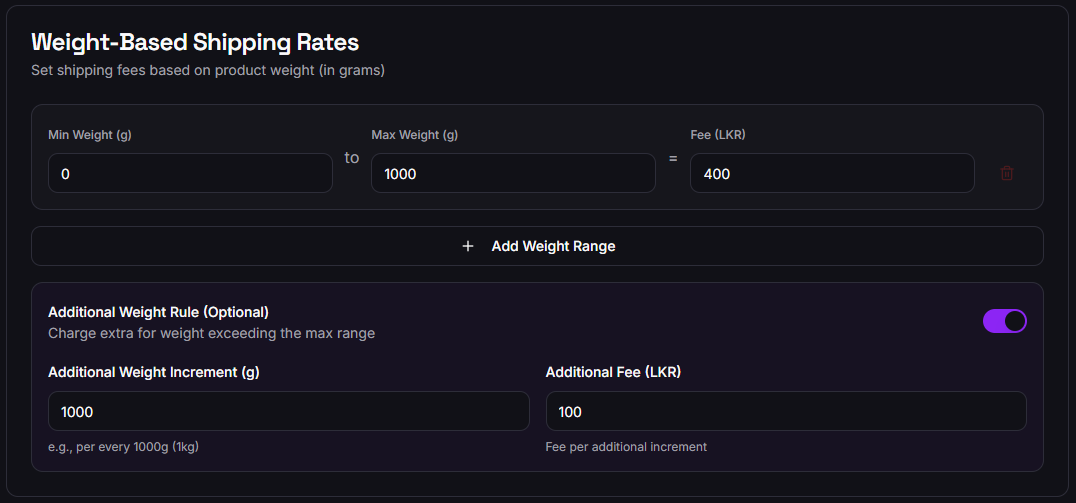 ***
### Step 1 — Set Base Weight Range
Define minimum and maximum weight range.
Example:
| Weight Range | Shipping Fee |
| ------------ | ------------ |
| 0g – 1000g | LKR 400 |
***
### Step 2 — Add Additional Weight Rules
Enable additional weight charging.
Example:
| Additional Weight | Additional Fee |
| ----------------- | -------------- |
| Every 1000g | LKR 100 |
This ensures heavier carts are charged correctly.
***
# 🌍 Shipping Zones Configuration
Shopi allows sellers to create shipping zones to apply different delivery pricing based on location.
***
## 🗺️ Zone-Based Shipping Use Cases
Sellers can configure:
* Colombo delivery rates
* Outstation delivery rates
* Province-based delivery pricing
* Courier partner-specific pricing
***
## ⚙️ Configure Shipping Zones
Sellers can:
* Create multiple delivery zones
* Assign delivery fees per zone
* Restrict delivery areas
* Customize delivery rules
***
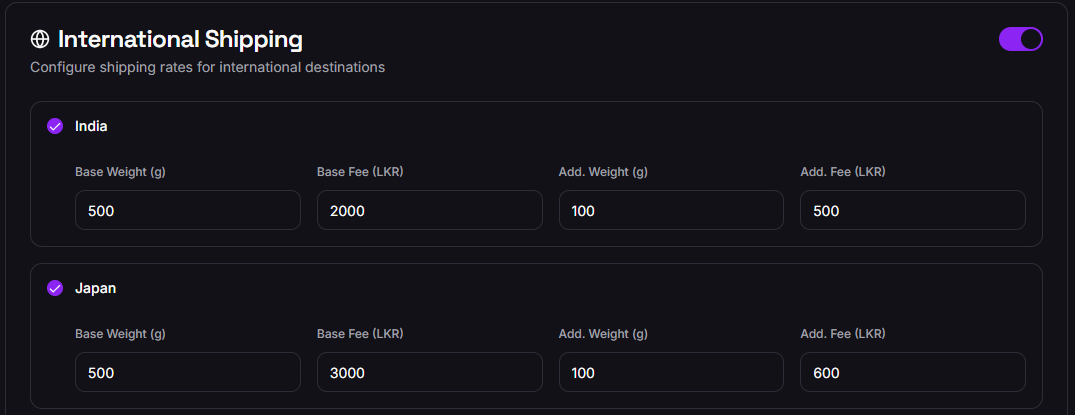
# ✈️ International Shipping Support
Shopi supports international delivery configuration.
Sellers can:
* Set country-specific shipping rates
* Configure international logistics pricing
* Apply weight-based international shipping rules
* Restrict unavailable shipping destinations
***
***
### Step 1 — Set Base Weight Range
Define minimum and maximum weight range.
Example:
| Weight Range | Shipping Fee |
| ------------ | ------------ |
| 0g – 1000g | LKR 400 |
***
### Step 2 — Add Additional Weight Rules
Enable additional weight charging.
Example:
| Additional Weight | Additional Fee |
| ----------------- | -------------- |
| Every 1000g | LKR 100 |
This ensures heavier carts are charged correctly.
***
# 🌍 Shipping Zones Configuration
Shopi allows sellers to create shipping zones to apply different delivery pricing based on location.
***
## 🗺️ Zone-Based Shipping Use Cases
Sellers can configure:
* Colombo delivery rates
* Outstation delivery rates
* Province-based delivery pricing
* Courier partner-specific pricing
***
## ⚙️ Configure Shipping Zones
Sellers can:
* Create multiple delivery zones
* Assign delivery fees per zone
* Restrict delivery areas
* Customize delivery rules
***
# ✈️ International Shipping Support
Shopi supports international delivery configuration.
Sellers can:
* Set country-specific shipping rates
* Configure international logistics pricing
* Apply weight-based international shipping rules
* Restrict unavailable shipping destinations
***
 ***
***
# 📦 Product Weight Management
Accurate shipping calculation requires correct product weight configuration.
***
## How To Set Product Weight
When creating or editing products:
* Enter product weight in grams
* Ensure packaging weight is included
* Maintain accurate product measurements
Correct product weight ensures accurate shipping pricing.
***
# ⚡ Real-Time Shipping Cost Calculation
Shopi automatically calculates shipping cost during checkout using:
* Product weights
* Cart weight total
* Shipping zone rules
* Additional weight pricing rules
Customers see transparent delivery charges before completing checkout.
***
# 📊 Business Benefits of Weight-Based Shipping
Businesses using weight-based shipping achieve:
✔ Accurate logistics pricing\
✔ Protection from shipping losses\
✔ Fair customer delivery pricing\
✔ Improved checkout transparency\
✔ Reduced order disputes
***
# 🧠 Shipping Optimization Best Practices
To improve logistics efficiency:
***
## 📦 Use Accurate Product Weights
Incorrect weight entries cause incorrect shipping fees.
***
## 🌍 Create Logical Shipping Zones
Divide zones based on courier pricing structures.
***
## ⚖️ Use Additional Weight Rules
Always configure incremental weight pricing for heavy orders.
***
## 🚚 Coordinate With Logistics Providers
Configure shipping pricing based on real courier charges.
***
# ⭐ Why Shopi Shipping Configuration Is Advanced
Shopi shipping system provides:
✔ Dynamic shipping pricing\
✔ Multi-zone logistics configuration\
✔ International delivery support\
✔ Weight-based cost calculation\
✔ Scalable shipping rules
***
# 🧭 Related Operations Guides
Learn how to manage orders, fulfillment workflow, and delivery processing.
Learn how to configure payment gateways and payment methods.
***
***
# 📦 Product Weight Management
Accurate shipping calculation requires correct product weight configuration.
***
## How To Set Product Weight
When creating or editing products:
* Enter product weight in grams
* Ensure packaging weight is included
* Maintain accurate product measurements
Correct product weight ensures accurate shipping pricing.
***
# ⚡ Real-Time Shipping Cost Calculation
Shopi automatically calculates shipping cost during checkout using:
* Product weights
* Cart weight total
* Shipping zone rules
* Additional weight pricing rules
Customers see transparent delivery charges before completing checkout.
***
# 📊 Business Benefits of Weight-Based Shipping
Businesses using weight-based shipping achieve:
✔ Accurate logistics pricing\
✔ Protection from shipping losses\
✔ Fair customer delivery pricing\
✔ Improved checkout transparency\
✔ Reduced order disputes
***
# 🧠 Shipping Optimization Best Practices
To improve logistics efficiency:
***
## 📦 Use Accurate Product Weights
Incorrect weight entries cause incorrect shipping fees.
***
## 🌍 Create Logical Shipping Zones
Divide zones based on courier pricing structures.
***
## ⚖️ Use Additional Weight Rules
Always configure incremental weight pricing for heavy orders.
***
## 🚚 Coordinate With Logistics Providers
Configure shipping pricing based on real courier charges.
***
# ⭐ Why Shopi Shipping Configuration Is Advanced
Shopi shipping system provides:
✔ Dynamic shipping pricing\
✔ Multi-zone logistics configuration\
✔ International delivery support\
✔ Weight-based cost calculation\
✔ Scalable shipping rules
***
# 🧭 Related Operations Guides
Learn how to manage orders, fulfillment workflow, and delivery processing.
Learn how to configure payment gateways and payment methods.