> ## Documentation Index
> Fetch the complete documentation index at: https://docs.shopi.lk/llms.txt
> Use this file to discover all available pages before exploring further.
# Custom storefronts
> Build fully customized Shopi.lk storefronts with the Shopi SDK, custom frontend tools, animations, and Shopi Whiz inside ChatGPT.
Sri Lankan customers do not only check whether a business has a Facebook page anymore. They check whether the business looks real, professional, fast, and easy to buy from.
A **Shopi custom storefront** gives your brand a complete online home — not just a basic catalog, not just a template, and not just a social media profile.
Developers can build fully customized online storefronts with their own frontend stack, custom layouts, animations, and UI systems. No-coders can build their own storefront using **Shopi Whiz**, an AI website builder inside ChatGPT.
With Shopi Whiz, you do not need to spend extra money on separate AI API keys to start building. Use your ChatGPT account, connect it with Shopi Whiz, and start creating a fully customized Shopi storefront.
## What is a Shopi custom storefront?
A custom storefront is the customer-facing website or shopping experience built on top of Shopi.lk.
Shopi powers the commerce foundation. Your storefront controls the experience.
This means your business can have a storefront that matches your brand, products, audience, and sales strategy instead of being locked into one fixed design.
Build with React, Vite, custom components, animations, landing pages, and the Shopi Storefront SDK.
Use Shopi Whiz inside ChatGPT to describe your store, generate pages, update sections, and prepare the storefront.
Create a professional online presence for local customers who search before they trust and buy.
Start simple, then add new pages, campaign sections, product layouts, and custom experiences as the business grows.
## How it works
A Shopi custom storefront connects your frontend experience with Shopi's commerce layer.
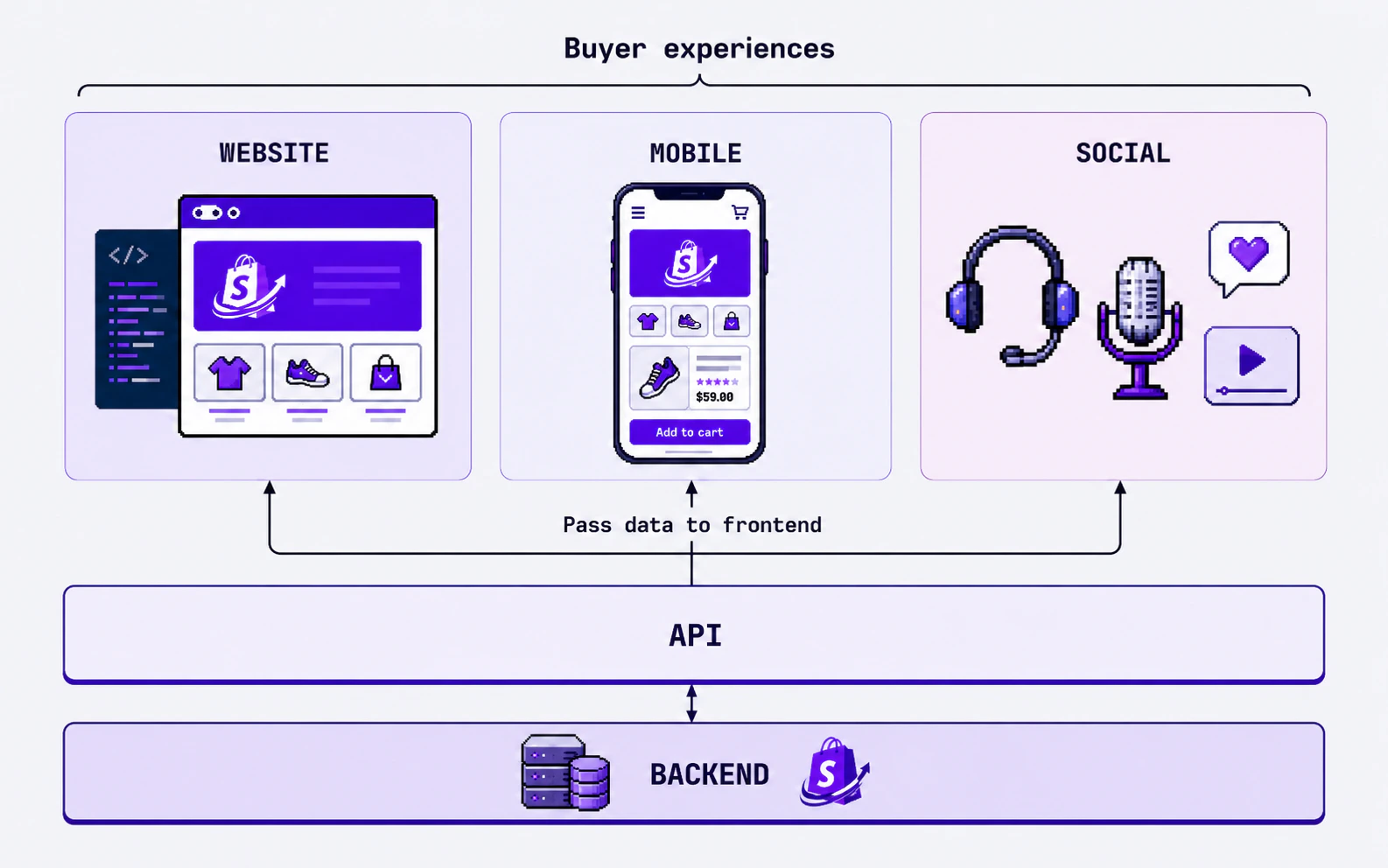 The seller prepares the shop, products, categories, and business details inside [shopi dashboard](https://admin.shopi.lk), where they run all their business operations.
Developers can use the Shopi SDK and their preferred frontend tools. No-coders can use Shopi Whiz inside ChatGPT.
Review the storefront experience, pages, layout, content, and mobile responsiveness before the live publish.
Once the storefront is ready, publish it as the business website or online store.
## Two ways to build
Developers can build fully customized storefronts using the Shopi Storefront SDK, APIs, and modern frontend frameworks.
This is the best option when you need:
* A unique brand experience
* Custom animations and sections
* Advanced product or collection layouts
* SEO-focused landing pages
* Campaign pages for offers and launches
* Full control over frontend code
```typescript theme={null}
import { Shopi } from '@shopi-lk/storefront-sdk';
const shop = new Shopi({
apiKey: process.env.SHOPI_API_KEY!,
});
const products = await shop.products.list();
```
Shopi Whiz helps non-technical business owners build a fully customized Shopi storefront through ChatGPT.
You can ask in normal language:
* "Create a premium homepage for a Sri Lankan shoe brand."
* "Add a best-selling products section."
* "Make the website mobile-friendly."
* "Use a clean layout with animations."
* "Create an offer page for a seasonal sale."
Shopi Whiz is ideal for business owners who want a professional storefront without learning code or paying for separate AI API keys.
## Why build custom instead of using a basic template?
Templates are useful for starting fast, but many businesses need more control as they grow. A custom storefront helps your brand stand out, explain your offer clearly, and create a better buying experience.
You can control the layout, sections, typography, colors, animations, product presentation, and customer journey. This is useful when your brand needs to look different from competitors.
A custom storefront can include hero sections, offer blocks, testimonials, FAQs, story sections, collection highlights, contact sections, and SEO-friendly landing pages.
Developers are not forced into one fixed theme structure. They can use modern tools, components, animations, and deployment workflows while keeping Shopi as the commerce foundation.
With Shopi Whiz, business owners can describe what they want and improve the storefront through conversation instead of manually editing code.
## What you can build
Clothing, shoes, accessories, and lifestyle brands with premium product pages.
Category-based storefronts for supermarkets, mini marts, and local grocery sellers.
Cosmetic, perfume, skincare, and personal care storefronts.
Mobile accessories, gadgets, electronics, and product-focused catalog websites.
Restaurant, bakery, catering, and food ordering storefront experiences.
Landing pages for businesses that sell services but still need online trust.
The seller prepares the shop, products, categories, and business details inside [shopi dashboard](https://admin.shopi.lk), where they run all their business operations.
Developers can use the Shopi SDK and their preferred frontend tools. No-coders can use Shopi Whiz inside ChatGPT.
Review the storefront experience, pages, layout, content, and mobile responsiveness before the live publish.
Once the storefront is ready, publish it as the business website or online store.
## Two ways to build
Developers can build fully customized storefronts using the Shopi Storefront SDK, APIs, and modern frontend frameworks.
This is the best option when you need:
* A unique brand experience
* Custom animations and sections
* Advanced product or collection layouts
* SEO-focused landing pages
* Campaign pages for offers and launches
* Full control over frontend code
```typescript theme={null}
import { Shopi } from '@shopi-lk/storefront-sdk';
const shop = new Shopi({
apiKey: process.env.SHOPI_API_KEY!,
});
const products = await shop.products.list();
```
Shopi Whiz helps non-technical business owners build a fully customized Shopi storefront through ChatGPT.
You can ask in normal language:
* "Create a premium homepage for a Sri Lankan shoe brand."
* "Add a best-selling products section."
* "Make the website mobile-friendly."
* "Use a clean layout with animations."
* "Create an offer page for a seasonal sale."
Shopi Whiz is ideal for business owners who want a professional storefront without learning code or paying for separate AI API keys.
## Why build custom instead of using a basic template?
Templates are useful for starting fast, but many businesses need more control as they grow. A custom storefront helps your brand stand out, explain your offer clearly, and create a better buying experience.
You can control the layout, sections, typography, colors, animations, product presentation, and customer journey. This is useful when your brand needs to look different from competitors.
A custom storefront can include hero sections, offer blocks, testimonials, FAQs, story sections, collection highlights, contact sections, and SEO-friendly landing pages.
Developers are not forced into one fixed theme structure. They can use modern tools, components, animations, and deployment workflows while keeping Shopi as the commerce foundation.
With Shopi Whiz, business owners can describe what they want and improve the storefront through conversation instead of manually editing code.
## What you can build
Clothing, shoes, accessories, and lifestyle brands with premium product pages.
Category-based storefronts for supermarkets, mini marts, and local grocery sellers.
Cosmetic, perfume, skincare, and personal care storefronts.
Mobile accessories, gadgets, electronics, and product-focused catalog websites.
Restaurant, bakery, catering, and food ordering storefront experiences.
Landing pages for businesses that sell services but still need online trust.
 ## Developer workflow
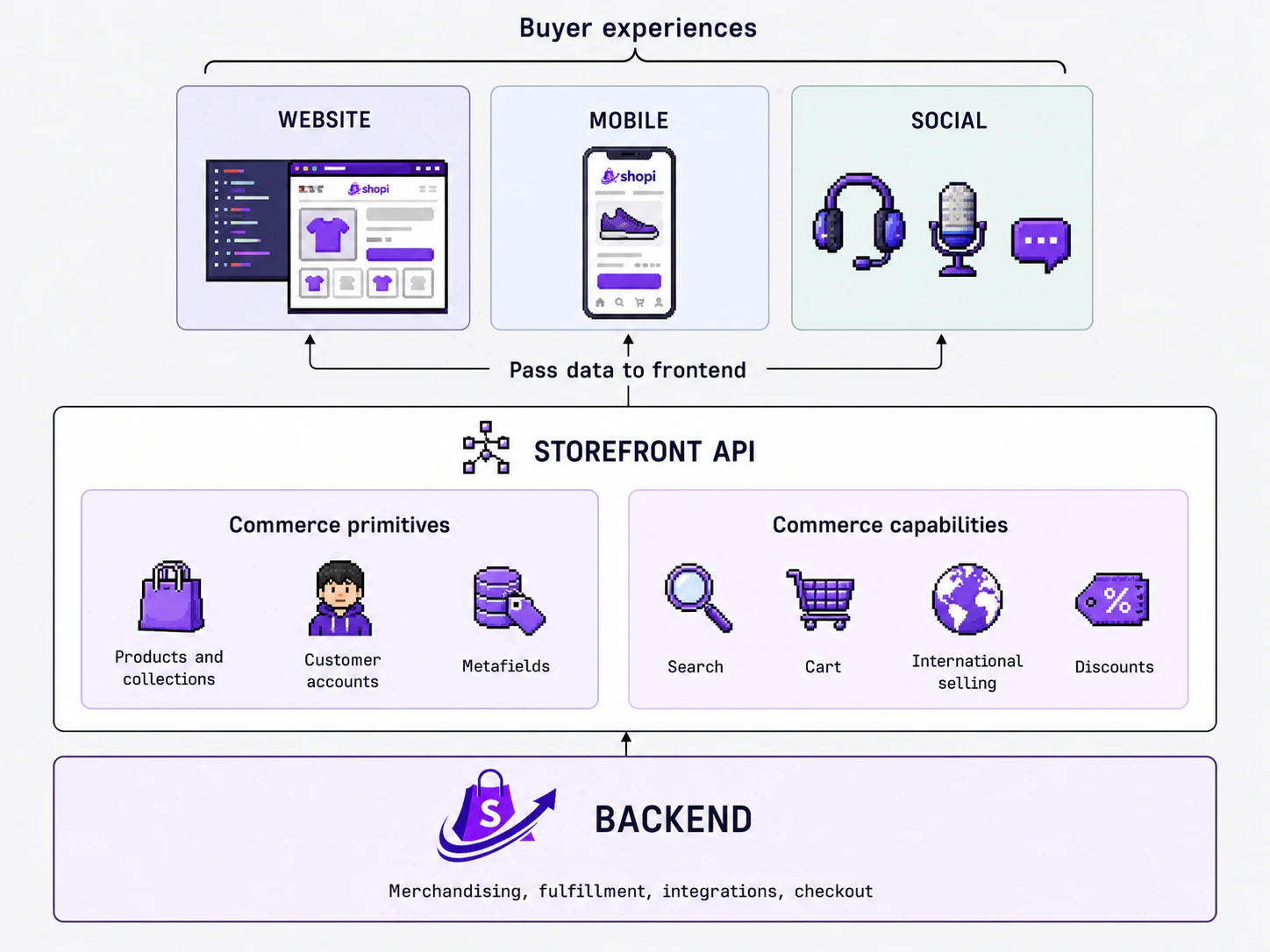
Developers can treat Shopi as the commerce base and focus on building a polished frontend experience.
```typescript theme={null}
import { Shopi } from '@shopi-lk/storefront-sdk';
const shop = new Shopi({
apiKey: process.env.SHOPI_API_KEY!,
});
export async function getStorefrontData() {
const [shopInfo, products, collections] = await Promise.all([
shop.store.get(),
shop.products.list(),
shop.collections.list(),
]);
return {
shopInfo,
products,
collections,
};
}
```
Do not hardcode real storefront API keys in public repositories. Use environment variables or a secure configuration flow when building production storefronts.
### Good for agencies and freelancers
A developer-built Shopi storefront is useful when the client needs a higher-quality experience than a normal template.
| Need | How custom storefronts help |
| -------------------- | ----------------------------------------------------------------------------------- |
| Brand-focused design | Build a storefront around the brand instead of forcing the brand into a template |
| Animations | Add motion, transitions, and interactive sections where they improve the experience |
| SEO pages | Create landing pages for categories, offers, locations, and product campaigns |
| Mobile-first UX | Design for Sri Lankan customers who browse and buy from mobile devices |
| Client flexibility | Keep the commerce data in Shopi while customizing the frontend experience |
## No-code workflow with Shopi Whiz
Shopi Whiz helps business owners create and improve a storefront by chatting inside ChatGPT.
Start from your existing ChatGPT account. You do not need to buy separate AI API keys just to begin.
Describe your business, products, preferred colors, pages, and design style.
Shopi Whiz helps create the first version of your Shopi storefront.
Request improvements like new sections, better content, mobile layout fixes, animations, or product page updates.
Review the storefront before publishing it as your official online store.
## Developer workflow
Developers can treat Shopi as the commerce base and focus on building a polished frontend experience.
```typescript theme={null}
import { Shopi } from '@shopi-lk/storefront-sdk';
const shop = new Shopi({
apiKey: process.env.SHOPI_API_KEY!,
});
export async function getStorefrontData() {
const [shopInfo, products, collections] = await Promise.all([
shop.store.get(),
shop.products.list(),
shop.collections.list(),
]);
return {
shopInfo,
products,
collections,
};
}
```
Do not hardcode real storefront API keys in public repositories. Use environment variables or a secure configuration flow when building production storefronts.
### Good for agencies and freelancers
A developer-built Shopi storefront is useful when the client needs a higher-quality experience than a normal template.
| Need | How custom storefronts help |
| -------------------- | ----------------------------------------------------------------------------------- |
| Brand-focused design | Build a storefront around the brand instead of forcing the brand into a template |
| Animations | Add motion, transitions, and interactive sections where they improve the experience |
| SEO pages | Create landing pages for categories, offers, locations, and product campaigns |
| Mobile-first UX | Design for Sri Lankan customers who browse and buy from mobile devices |
| Client flexibility | Keep the commerce data in Shopi while customizing the frontend experience |
## No-code workflow with Shopi Whiz
Shopi Whiz helps business owners create and improve a storefront by chatting inside ChatGPT.
Start from your existing ChatGPT account. You do not need to buy separate AI API keys just to begin.
Describe your business, products, preferred colors, pages, and design style.
Shopi Whiz helps create the first version of your Shopi storefront.
Request improvements like new sections, better content, mobile layout fixes, animations, or product page updates.
Review the storefront before publishing it as your official online store.
 ## Example prompts for Shopi Whiz
Use simple instructions. Shopi Whiz is designed to understand business needs, not just technical commands.
Create a modern online storefront for a Sri Lankan shoe brand. Use a premium hero section, product grid, customer reviews, and a clean mobile-first layout.
Make the homepage look more professional. Add a strong headline, best-selling products, trust badges, delivery information, and a contact section.
Add smooth animations to the hero section, product cards, buttons, and section transitions. Keep it professional and fast.
Create a New Year offer page with a hero banner, offer cards, countdown section, featured products, and WhatsApp contact CTA.
## Shopi.lk for Sri Lankan businesses
Shopi.lk is built for practical online selling in Sri Lanka.
A social media page can help people discover your business. A proper storefront helps customers trust your business, understand your products, and take action.
A Shopi storefront gives your brand a permanent online place where customers can explore products, read business information, and buy or contact you with confidence.
## Key benefits
Build storefronts that match the brand instead of relying only on common layouts.
Use the Shopi SDK, APIs, React, Vite, and your preferred frontend workflow.
Let business owners build and update storefronts through Shopi Whiz inside ChatGPT.
Start with your ChatGPT account instead of paying separately for AI API keys.
Help Sri Lankan businesses look real, professional, and ready to sell online.
Add new pages, campaigns, sections, products, and experiences as the business grows.
## Build options
| Build option | Best for | Skill level | Main advantage |
| ---------------- | -------------------------------------------------- | ----------- | -------------------------------------------------------- |
| Developer build | Agencies, freelancers, startups, advanced brands | Technical | Full frontend control with custom code and animations |
| Shopi Whiz build | Small businesses, creators, first-time sellers | No-code | Build through ChatGPT without separate AI API key cost |
| Hybrid build | Businesses that want AI speed and developer polish | Mixed | Start with AI, then let developers refine the storefront |
## Recommended assets before you start
Prepare these items before building your storefront.
* Logo in light and dark versions
* Brand colors
* Product images
* Product names and descriptions
* Business contact details
* Delivery or pickup information
* Customer reviews or testimonials
* Homepage sections you want to include
* Example websites or styles you like
## Final thought
A custom storefront is not only about design. It is about trust, control, and growth.
With Shopi.lk, developers can build advanced storefronts with full creative freedom. No-coders can use Shopi Whiz inside ChatGPT to build their own website without spending extra money on separate AI API keys.
For Sri Lankan businesses, the message is simple:
Start small. Look professional. Grow with a storefront that truly belongs to your brand.
## Next steps
Prepare your shop, products, brand information, and storefront requirements.
Use the developer workflow, Shopi Whiz no-code workflow, or a hybrid approach.
Review design, mobile layout, pages, content, and customer journey before publishing.
Launch the storefront and continue improving it as your business grows.
## Example prompts for Shopi Whiz
Use simple instructions. Shopi Whiz is designed to understand business needs, not just technical commands.
Create a modern online storefront for a Sri Lankan shoe brand. Use a premium hero section, product grid, customer reviews, and a clean mobile-first layout.
Make the homepage look more professional. Add a strong headline, best-selling products, trust badges, delivery information, and a contact section.
Add smooth animations to the hero section, product cards, buttons, and section transitions. Keep it professional and fast.
Create a New Year offer page with a hero banner, offer cards, countdown section, featured products, and WhatsApp contact CTA.
## Shopi.lk for Sri Lankan businesses
Shopi.lk is built for practical online selling in Sri Lanka.
A social media page can help people discover your business. A proper storefront helps customers trust your business, understand your products, and take action.
A Shopi storefront gives your brand a permanent online place where customers can explore products, read business information, and buy or contact you with confidence.
## Key benefits
Build storefronts that match the brand instead of relying only on common layouts.
Use the Shopi SDK, APIs, React, Vite, and your preferred frontend workflow.
Let business owners build and update storefronts through Shopi Whiz inside ChatGPT.
Start with your ChatGPT account instead of paying separately for AI API keys.
Help Sri Lankan businesses look real, professional, and ready to sell online.
Add new pages, campaigns, sections, products, and experiences as the business grows.
## Build options
| Build option | Best for | Skill level | Main advantage |
| ---------------- | -------------------------------------------------- | ----------- | -------------------------------------------------------- |
| Developer build | Agencies, freelancers, startups, advanced brands | Technical | Full frontend control with custom code and animations |
| Shopi Whiz build | Small businesses, creators, first-time sellers | No-code | Build through ChatGPT without separate AI API key cost |
| Hybrid build | Businesses that want AI speed and developer polish | Mixed | Start with AI, then let developers refine the storefront |
## Recommended assets before you start
Prepare these items before building your storefront.
* Logo in light and dark versions
* Brand colors
* Product images
* Product names and descriptions
* Business contact details
* Delivery or pickup information
* Customer reviews or testimonials
* Homepage sections you want to include
* Example websites or styles you like
## Final thought
A custom storefront is not only about design. It is about trust, control, and growth.
With Shopi.lk, developers can build advanced storefronts with full creative freedom. No-coders can use Shopi Whiz inside ChatGPT to build their own website without spending extra money on separate AI API keys.
For Sri Lankan businesses, the message is simple:
Start small. Look professional. Grow with a storefront that truly belongs to your brand.
## Next steps
Prepare your shop, products, brand information, and storefront requirements.
Use the developer workflow, Shopi Whiz no-code workflow, or a hybrid approach.
Review design, mobile layout, pages, content, and customer journey before publishing.
Launch the storefront and continue improving it as your business grows.